Gaming across 3 monitors?

Joined
Feb 4, 2002
Messages
19,879
Location
Horsens, Denmark
If I had 3 52" 1080P screens in front of me, and I wanted games to play across all three (driving simulators specifically), what would it take? Is this only possible with software that is designed for it? Most gaming cards only have two outputs, would games support a pair of cards? Is ATI or nVidia better for such a thing?

Thanks for your thoughts.
 
It would take a Matrox TripleHead2Go or 2 identical cards with crossfire/SLI turned off and game support for a FOV and resolution that works across your 3 monitors.

The matrox solution is guaranteed to work, but it's kind of ugly for anything but full screen apps and cannot support the full resolution of three 1080P displays. For gaming it may be OK. The 2 card method may or may not work, depending on the cards, drivers and game software.
 
Thanks for the info. It looks like the product I'm looking to beat uses the TripleHead2Go, as their supported product list is identical. I consider the lost resolution unacceptable, so I'll likely be going to a single 65" and calling it good.
 
I actually have two different customers who would be interested in such a thing. One is a day trader who is looking for a wall of monitor for all his graphs. The other would be for a dedicated driving simulator.
 
Just talked to the simulator client, and 42" screens would be too big for the install. 37" might work, but I might retreat all the way to 32".

For the day trader I might go to projectors so it can be larger and not have any seams at all.
 
http://www.neogaf.com/forum/showpost.php?p=20520282&postcount=1809

"The XFX Radeon HD 5970 4GB Black Edition video card will be a limited edition card with an estimated hundreds of graphics cards being made. XFX expects to begin selling the cards in about a month for roughly $100 more than a standard Radeon HD 5970, which is $699 to $750 if you can find them. This would make the XFX Radeon HD 5970 4GB Black Edition to be around $799 to $850 based on our assumptions."

A little pricey but when you are driving 5 monitors you want all the powa you can get.
 
I actually have two different customers who would be interested in such a thing. One is a day trader who is looking for a wall of monitor for all his graphs. The other would be for a dedicated driving simulator.

nws12269149537905729-450x299.jpg


http://www.sonyinsider.com/2008/11/19/gran-turismo-in-4-times-the-resolution-of-full-hd/

Can't beat a projector if you have light control IMHO.
 
I just read where a monitor company was selling a 'wall' of six monitors with a narrow stripe between them. Sounds like just what you need.

But I can't remember where I saw it or who it was.

I'll search to see if I can find it again.
 
Yeah I don't know if I would go with 5 projectors. If you had room for a rear projection setup perhaps. I was thinking for the day trader if he can pony up for a 4K projector just the one 4096*2048 expanse might be enough.

I was designing a control room for a datacenter, went with ten 52" Sharp Aquos', in a 5 screen wide by 2 high grid. Major systems were monitored there. You could sit back and see the wall of screens. Drop your eyes a tad and you were looking at the local screens, for detail work. Each operator had a pair of 27" screens in front of them, had to use some custom PC/controller doodad to have the video wall seamless and accessible by any operator. No pics unfortunately but the room was wide enough and not too deep.

Did work with the manufacturer of the furniture in the design, making sure the angles worked in terms of visuals. End result, the operators were happy. And we have a shiny showcase for the higher ups that approved the funding.

 
I saw the 6-monitor setup this past weekend at PAX and I didn't like it for gaming. The cross hairs were right at the two edges of the center monitors making it really annoying. If they had a 9 monitor configuration, that would be ideal.
 
I saw the 6-monitor setup this past weekend at PAX and I didn't like it for gaming. The cross hairs were right at the two edges of the center monitors making it really annoying. If they had a 9 monitor configuration, that would be ideal.

That is why I was looking at the 5-wide in portrait mode. The center is a single screen.
 
http://www.neogaf.com/forum/showpost.php?p=20520282&postcount=1809

"The XFX Radeon HD 5970 4GB Black Edition video card will be a limited edition card with an estimated hundreds of graphics cards being made. XFX expects to begin selling the cards in about a month for roughly $100 more than a standard Radeon HD 5970, which is $699 to $750 if you can find them. This would make the XFX Radeon HD 5970 4GB Black Edition to be around $799 to $850 based on our assumptions."

A little pricey but when you are driving 5 monitors you want all the powa you can get.

Fantastic. That is exactly what I'm after. Buying several of those is going to hurt....
 
I saw the 6-monitor setup this past weekend at PAX and I didn't like it for gaming. The cross hairs were right at the two edges of the center monitors making it really annoying. If they had a 9 monitor configuration, that would be ideal.

You could mount them 2 wide and three high.
 
If I did that, then the crosshair would still be stuck in the middle and I think the perspective would be weird. I think David's suggestions of turning them all portrait and using 5 would be the best way to get a direct center view without a screen edge in the way.
 
I'll be ordering one of the 5970 E6 cards when available. At the very least I'll be trying it for myself with 5 Acer B273HU 27" monitors. 23.5" high and 65" wide at 5760x2048 will fit nicely on my desk.
 
Wonder what 3 big TV's would look like???

37-60", and, can that card drive them?
 
The size of the screen doesn't matter, only the resolution and input. Three 1920x1080 monitors with HDMI inputs? Sure, no problem at all.
 
I ran 3 monitors, 21 and two 19 inch CRT's, using the Matrox 750. It did it, but, was so under powered the screen resolution was disappointing, in games only.

Awesome for work clarity. Can the current screens display in billions of colors?
 
Some can, but many are the TFN screens that really don't.
 
David, I think it's amazing that you've envisioned this product that has taken more than 2 years to come to market, and even then seems potentially immature (I just updated to the latest Radeon driver suite and it seems to have broken my dual monitor display on a 4670)
 
The 3-wide 3D was what nVidia was demoing at PAX and it did look pretty nice. The depth of the 3rd dimension wasn't as pronounced as I expected. You could certainly tell the depth was there, but I had different expectations. As I watched the BF BC2 demo, I was continually asking myself if this 3D technology would help the game experience or just look cool. Without extensive play, I wasn't able to decide, but I felt as if it was more for visual fun than to help the game experience. I would enjoy the 3-wide with normal 2D. They also demo'ed Dirt 2, so it sounds consistent with the link you provided.

After watching the demo for a few minutes, when I stepped away and removed the goggles I felt weird (visually) as I adjusted to the change. I don't know if I could tolerate hours of gaming with 3D.
 
Anyone with an older Mitsubishi DLP based rear projector labelled as 3D ready should be good to go with perhaps an outboard adaptor to take the input from a 3D blu-ray player etc.

Dell has a bunch of them real cheap, large size for the dollar but prone to rainbows etc.
 
I'll be ordering one of the 5970 E6 cards when available. At the very least I'll be trying it for myself with 5 Acer B273HU 27" monitors. 23.5" high and 65" wide at 5760x2048 will fit nicely on my desk.

Think you'll be happier with an upgraded 5970 w/4GB, and why just Acer 27in? Go for the new Dell (LCD backlit version of Apple's high-res LED backlit 27in iMac) 27in IPS 2560 x 1440, meh only $1k ea , just like the 4GB XFX Blk ed. 5970E6 (<rumor cost) :D ...U don't really need that house or a new car.

Could also go for the LED ver. when Apple releases (rumor soon?) a stand alone Cinema Display of 27in, given it's in the iMac, can't see how they could price it much more than the Dell...or could they :)

http://www.tomshardware.com/news/Dell-LCD-monitor-UltraSharp-HD,9652.html

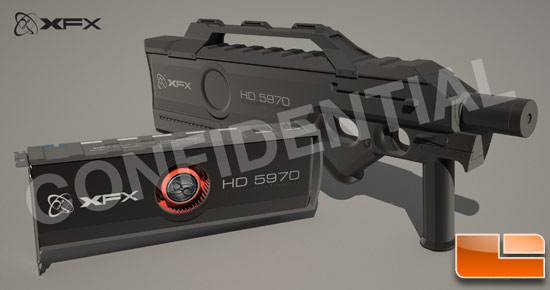
lmao, machine gun boxed!

XFX_5970_4GB_gpu.jpg


http://forums.guru3d.com/showthread.php?t=318632&page=2
XFX also informed Legit Reviews that they have designed a special shipping crate that is the plastic gun that is seen in the image above. When you get one of these limited edition graphics cards it will come in the spiffy little carrying case that looks like an FNH P90 at first glance.
Having a setup of EYEFINITY all i can i say is that you need more than a 5970 2gb in order to run games 5760*1080 in high settings
 
I've decided to hold off on buying that many large screens until I can get them 3D capable as well, even if the first GPU I hook them to (5970 E6) can't support it.
 
Any idea how hard it would be to get shutter glasses and 3 separate 3d displays synced? I would think you would need displays designed specifically to do it since I think the glasses sync with the display rather than the PC, so you would need the displays to communicate directly and sync their refreshes. (Or just have 3 identical displays wired up to one power switch with cables all the same length and cross your fingers...)
 
Any idea how hard it would be to get shutter glasses and 3 separate 3d displays synced? I would think you would need displays designed specifically to do it since I think the glasses sync with the display rather than the PC, so you would need the displays to communicate directly and sync their refreshes. (Or just have 3 identical displays wired up to one power switch with cables all the same length and cross your fingers...)

An interesting point. If it synced with the monitor you were looking at at the moment, that could be disconcerting.
 
The glasses usually sync via an IR or Bluetooth signal. TV will either have the transmitter built- in or as an add-on.
 
The nvidia solution is some type of IR as Pradeep suggested. When I was viewing the demos, someone stepped in the line of sight of the IR and the goggles stop syncing and it's a very strange sensation. The transmitted was sitting on the desk, but I don't know how it was connected to the computer (usb, etc).
 
Back
Top